
Price on Request
Configure Price on Request in RepairPlugin to handle unpriced repairs with quote workflows, booking options, and payment visibility.
What can you do with this?
- Avoid showing "$0.00" -- any repair with a price of 0 automatically displays as "Price on Request" on the front end.
- Capture leads before setting prices -- start taking requests even while you're still building your catalog.
- Choose the booking flow -- let customers book directly with unpriced repairs, or require a quote process first.
- Control payment visibility -- decide whether online payment methods show up for orders that contain price-on-request repairs.
- Set prices after the fact -- provide a price for just one appointment or apply it to all recent and future appointments at once.
Where to find it
- In the WordPress admin menu, go to RepairPlugin.
- Click Settings.
- In the sidebar, select Checkout & Discount.
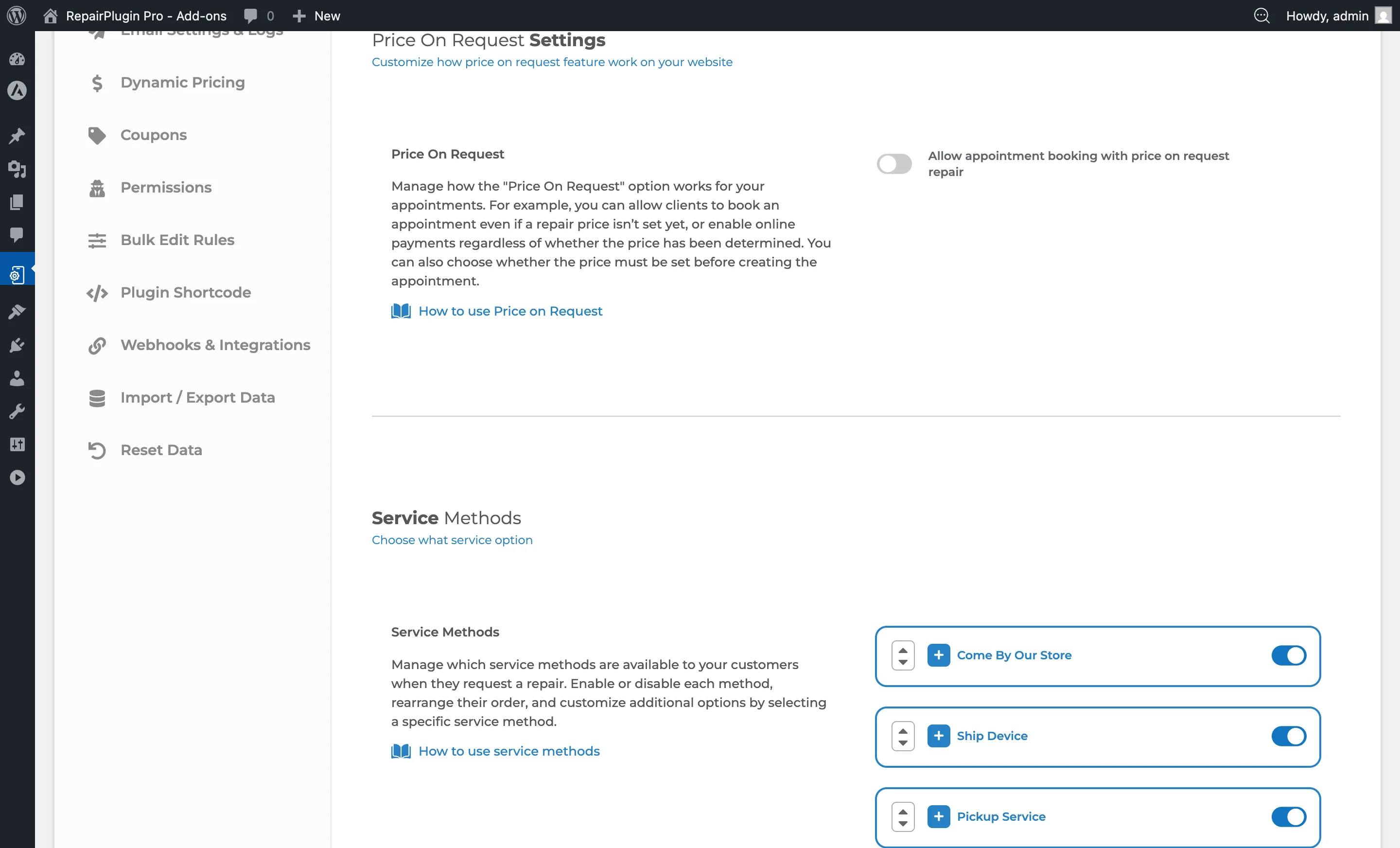
- Scroll down to the Price On Request Settings section (located above the Service Methods section).
How to set it up
Allow customers to book with price-on-request repairs
- Navigate to the Price On Request Settings section.
- Switch Allow appointment booking with price on request repair to ON.
- Optionally, enable Accept online payments even when appointment contains any price on request repair.
- Choose the Action when appointment contains any price on request repair from the dropdown.
- Click Save.
When this switch is ON, customers can continue through the booking flow -- selecting a service method, date, and time -- even if one or more selected repairs has no price set.
Require a quote before booking
- Switch Allow appointment booking with price on request repair to OFF.
- Click Save.
When this switch is OFF, customers who select a price-on-request repair see a quote popup instead of the booking flow. They can't complete a booking until you provide a price.
Set a price for a "Price on Request" appointment
Once a customer submits a request with a price-on-request repair, the appointment enters a pending phase with the status "Price on Request." You can then set the price in two ways:
- For the current appointment only -- set the price directly on that single appointment.
- For all recent and future appointments -- this applies the price to all appointments from the last 7 days where the repair is still listed as "Price on Request" and hasn't been priced yet, as well as to all future appointments. The updated price is visible immediately.
After you set the price, the customer receives a quote email with a link to confirm their appointment.
Note: When importing models and repairs, all repairs are automatically set to "Price on Request" because their default price is 0. If you want to offer a repair for free (rather than as price on request), go to Models & Repairs and check the "Free" box for that repair.
Settings reference
| Setting | Description | Default | Customers see |
|---|---|---|---|
| Allow appointment booking with price on request repair | When enabled, customers can proceed with booking an appointment even when one or more repairs in their selection have no price set | off. When disabled, RepairPlugin shows a quote request popup instead, preventing booking until a price is provided | ON -- the full booking flow (service method, date/time selection). OFF -- a quote request popup where they can't schedule an appointment. |
| Accept online payments even when appointment contains any price on request repair | When enabled, online payment methods (Stripe, PayPal, Mollie, etc.) are shown at checkout even if the appointment contains price-on-request repairs | off. This option is only visible when "Allow appointment booking" is ON | ON -- payment method selection appears at checkout as normal. OFF -- payment methods are hidden for orders containing price-on-request items. |
| Action when appointment contains any price on request repair | Controls the workflow after checkout with a price-on-request repair. Options: "Set the Price before creating the appointment" (status set to Price on Request, customer gets a quote email to confirm) or "Create the appointment" (created immediately, price provided later). Only visible when "Allow appointment booking" is ON | "Set the Price before creating the appointment" | With "Set the Price," they see a thank-you message. With "Create the appointment," they receive standard confirmation. |
Frequently asked questions
Why do all imported repairs show as "Price on Request"?
When you import models and repairs, every repair gets a default price of 0. RepairPlugin automatically shows any repair with a price of 0 as "Price on Request." To fix this, go to Models & Repairs and set the correct price, or check the "Free" box if the repair is genuinely free.
Can I set the price for multiple appointments at once?
Yes. When you set a price for a repair, you can choose to apply it to all appointments from the last 7 days that still have the "Price on Request" status, plus all future appointments for that repair.