
Privacy & Data Processing
Learn how RepairPlugin handles privacy and data — all customer data stays in your WordPress database for full GDPR control.
What can you do with this?
- Own all your data -- Unlike SaaS tools, RepairPlugin doesn't store customer information on its servers. Everything lives in your WordPress database.
- Stay GDPR-compliant -- You decide where data is stored, which hosting provider to use, and in which country your server is located
- Keep business data private -- Your pricing, customer lists, and appointment data never leave your server
- Control data exports and deletion -- Export all plugin data for backups or delete everything when needed
Where to find it
Path: There's no specific privacy settings page in RepairPlugin. Data is stored locally by design.
To review what data RepairPlugin stores:
- Access your WordPress database via phpMyAdmin or a similar database management tool
- Look for tables with the
rs_prefix (e.g.,wp_rs_customer,wp_rs_orders) - These tables contain all data managed by RepairPlugin
To manage data export or deletion:
- Go to RepairPlugin > Settings > Import / Export Data to export or import plugin data
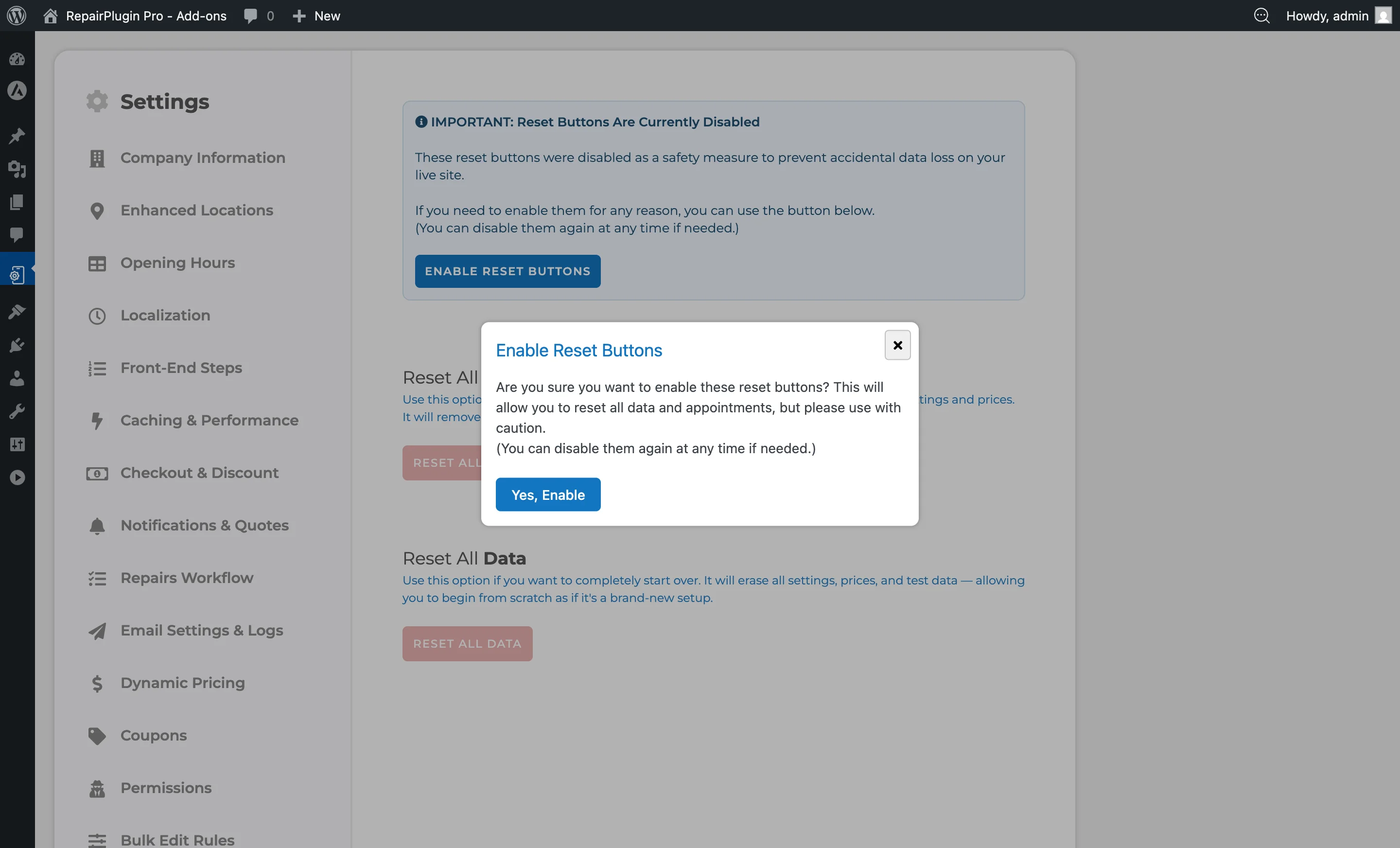
- Go to RepairPlugin > Settings > Reset Data to delete all RepairPlugin data (use with extreme caution)
How to set it up
Ensuring GDPR compliance
While RepairPlugin stores data locally, you as the website owner are responsible for GDPR compliance. Here are recommended steps:
Add a privacy policy
- Update your website's privacy policy to disclose that you collect customer data through the repair booking form
- Mention what data is collected: name, email, phone number, address (if enabled), device information, and repair details
- State the legal basis for processing (typically "legitimate interest" or "contract performance")
Configure data retention
- Regularly review and clean up old customer and order data that you no longer need
- Use RepairPlugin > Customers to manage customer records
- Use RepairPlugin > Appointments to manage and export order data
Enable security checks for forms
- By default, RepairPlugin includes security checks for front-end forms to prevent unauthorized submissions
- This setting is found at RepairPlugin > Settings > Front-End Steps > CSRF Protection for Front-End Forms
- Keep this enabled unless you experience caching conflicts (see Troubleshooting Conflicts)
Secure your WordPress installation
- Use HTTPS on your website to encrypt data in transit
- Keep WordPress, RepairPlugin, and all plugins updated
- Use strong passwords and limit admin access
- Choose a reputable hosting provider with proper security measures
Data after uninstalling
When you deactivate RepairPlugin, your data stays in the WordPress database. The rs_ tables aren't automatically deleted on deactivation. To fully remove all RepairPlugin data:
- Go to RepairPlugin > Settings > Reset Data
- Use the reset function to clear all plugin data
- Then deactivate and delete the plugin
What RepairPlugin does NOT store on its servers
RepairPlugin doesn't store any of the following on its own servers:
- Customer personal information (names, phone numbers, email addresses, addresses)
- Appointment and booking data
- Repair orders and their statuses
- Pricing and discount configurations
- Company information and location details
- Payment transaction details
- Email logs and communication history
- Quotes and PDF documents
What RepairPlugin DOES communicate externally
The only external communication RepairPlugin makes is:
- License verification -- RepairPlugin checks the validity of your license key against its licensing database. This transmits only your license key and domain name.
- Model/repair downloads -- When you download device models and repairs from the RepairPlugin cloud database, data flows from RepairPlugin's servers to your installation (not the other way around).
- Dynamic Pricing sync (Growth and Scale plans) -- If you use Dynamic Pricing, the plugin fetches supplier pricing data. This involves downloading pricing from supplier databases, not sending your data out.
Data stored in your WordPress database
RepairPlugin creates its own database tables (prefixed with rs_) within your WordPress database. Key tables include:
| Table | Purpose |
|---|---|
rs_customer | Customer names, phone numbers, emails, addresses |
rs_orders | All booking/appointment orders |
rs_order_repairs | Repairs linked to each order |
rs_order_upsales | Upsale items linked to orders |
rs_company_information | Your company name, email, phone, logo, registration numbers |
rs_company_location | Store locations with addresses, schedules, and maps links |
rs_company_schedules | Opening hours and break times per location |
rs_brand | Device brands |
rs_model | Device models |
rs_default_repair | Repair types with pricing and durations |
rs_coupons | Discount coupon codes and rules |
rs_notifications_and_offers | Email notification templates |
rs_configure_mail | SMTP email configuration |
rs_google_calendar | Google Calendar integration settings |
rs_outgoing_triggers | Webhook configurations |
rs_localization | Language and localization settings |
In total, RepairPlugin creates 70+ database tables to manage all aspects of the repair booking workflow.
Settings reference
| Setting | Description | Default | Customers see |
|---|---|---|---|
| Import / Export Data | Lets you export all RepairPlugin data as a backup file or import data from a previous export Tip: Exported files contain all customer and business data. Store them securely and don't share them publicly. | N/A | Nothing -- this is an admin-only feature. |
| Reset Data | Permanently deletes all RepairPlugin data from your database Tip: This is irreversible. It removes all customer, order, and configuration data. Always create a backup first. | N/A | Nothing -- this is an admin-only feature. |
| CSRF Protection for Front-End Forms | Adds security checks to front-end forms to prevent unauthorized form submissions Tip: Keep this enabled. Only turn it off if you experience caching conflicts -- and re-enable it once the conflict is resolved. | on | Nothing visible. The security check runs in the background. |
| Customer Address Fields | Controls which address fields are shown in the booking form Tip: Collecting less data minimizes your GDPR obligations. Only ask for what you actually need. | varies by field | More or fewer address fields during checkout. |
| Email Settings & Logs | Lets you configure SMTP settings and view sent email logs Tip: Email logs may contain customer data. Review and clear them periodically. | N/A | Nothing directly. This affects how emails are delivered. |
Frequently asked questions
Does RepairPlugin send my customer data to external servers?
No. All customer data stays in your own WordPress database. The only external communication is license verification (which only sends your license key and domain) and model/repair downloads (which only receive data, not send it).
What happens to my data if I uninstall RepairPlugin?
Your data stays in the database. RepairPlugin doesn't automatically delete its rs_ tables when you deactivate or delete the plugin. To remove everything, go to RepairPlugin > Settings > Reset Data before uninstalling.
Is RepairPlugin GDPR-compliant?
RepairPlugin's self-hosted architecture supports GDPR compliance, but you're responsible for adding a proper privacy policy, managing data retention, and securing your WordPress installation.